
WhatsApp translation and AI replies on Mac
Sendumi adds AI writing tools and two-way text translation to WhatsApp conversations on Mac. You can translate received and sent messages, write in your preferred language, and prepare a reply in your customer’s language. You review the result before sending.
Free Early Access for Apple silicon Macs. No card or payment required until commercial release.
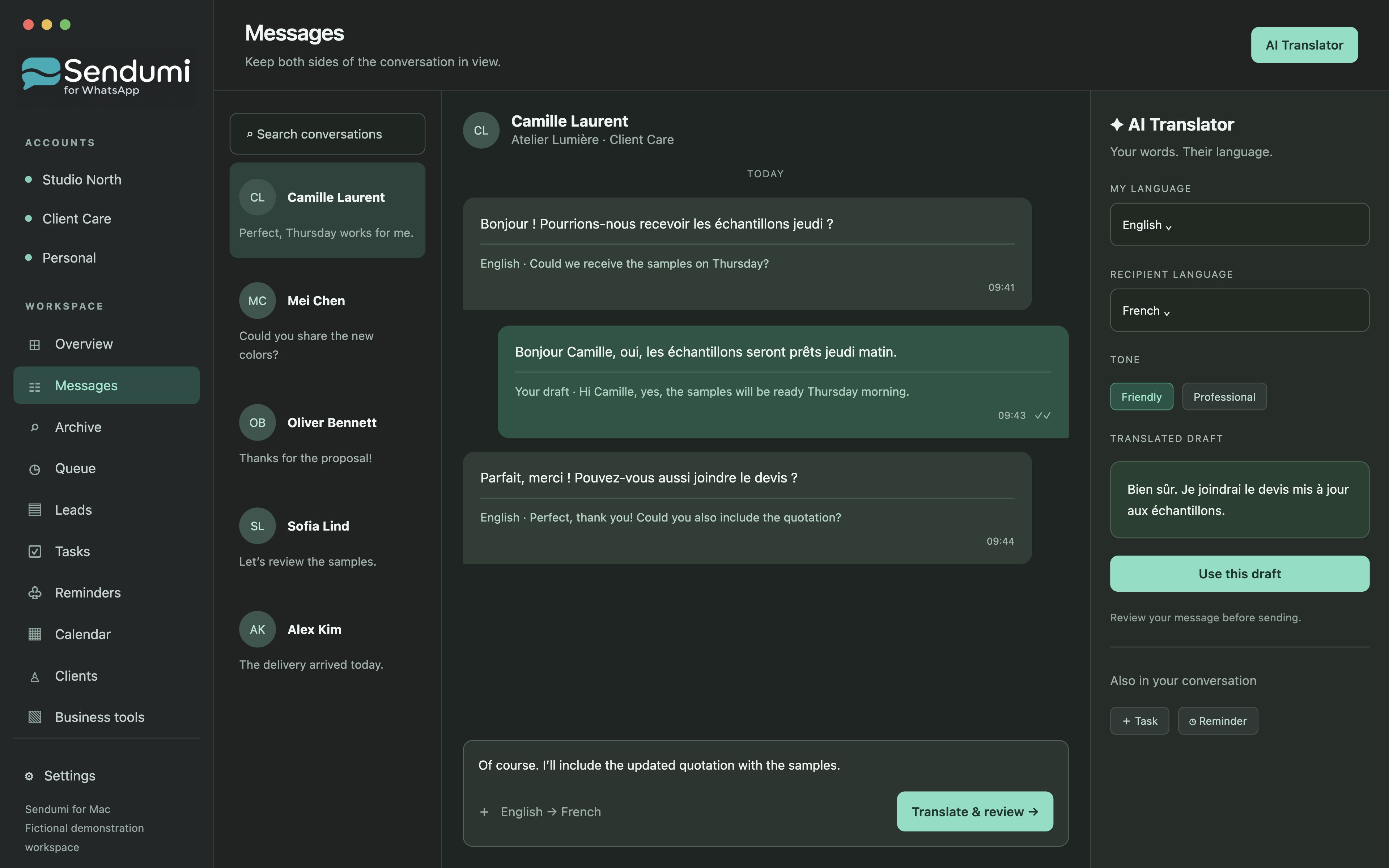
Keep the meaning across languages
A conversation can start in French while your working language is English. Turn on translation for that chat to understand incoming text, then prepare a response in French. The original message provides context for your review.
Translation is enabled per chat. Your app interface language is a separate setting: changing the interface does not change the language of your customers’ messages. AI output can need correction, especially for names, quantities and specialist terminology.
Write a reply with the right context
Use the AI assistant to reply to a message, rewrite a draft or start a new message. Explain what you want to say in Comment to Message, then choose the tone and target language. Review whether your draft answers the customer’s questions before using it.
For example, a fictional customer asks when samples will be ready. You can give the assistant the confirmed date and ask for a concise, friendly reply. Check that the final wording keeps your actual commitment and does not invent a delivery promise.
What you need, and what AI receives
AI features currently require your own OpenAI API key. Provider usage is billed separately from the Sendumi subscription. When you use an AI feature, relevant text and selected conversation context are sent to the configured provider for processing.
The translation and writing workflow described here is available in free Early Access. It is intended to assist your decisions; you remain responsible for checking a message before sending it.
The workflow, step by step
- Connect your WhatsApp account and choose a conversation.
- Enable translation for that chat or open the AI assistant for a draft.
- Specify your intent, tone and target language.
- Check names, numbers and meaning, then send the reviewed message.
Common questions
Can Sendumi translate incoming and outgoing WhatsApp messages?
Yes. Sendumi supports text translation for received and sent messages, enabled per chat. You can also prepare a draft in another language and review it before sending.
Does the subscription include AI usage?
No. AI features currently require your own OpenAI API key, and provider usage is billed separately.
Explore Sendumi
macOS 14 or later · Apple silicon (M1 or newer). Sendumi is an independent macOS app developed by InSpe. It is not affiliated with, endorsed by or sponsored by WhatsApp or Meta.
See planned pricing & availability